

PunchOut
How cXML PunchOut works: Technical process & steps
#What is cXML PunchOut?
This article focuses specifically on the underlying technical details and protocols of a cXML PunchOut connection. Looking for a general explanation of the process? Discover how a how a PunchOut connection works for your webshop. Already know which e-procurement software you need to connect with? Check our available PunchOut integrations.
cXML PunchOut is a standard developed by Ariba (now SAP Ariba) that utilizes HTTP(S) methods to exchange cXML files. Generally, cXML PunchOut is primarily used by American procurement software suites such as Coupa, Ariba, and Oracle. While the OCI standard is widely used in Europe, cXML is the global benchmark for large enterprises. With a cXML PunchOut catalog, buyers can log in directly and securely to your B2B webshop right from their own procurement system.
#How does a cXML PunchOut connection work?
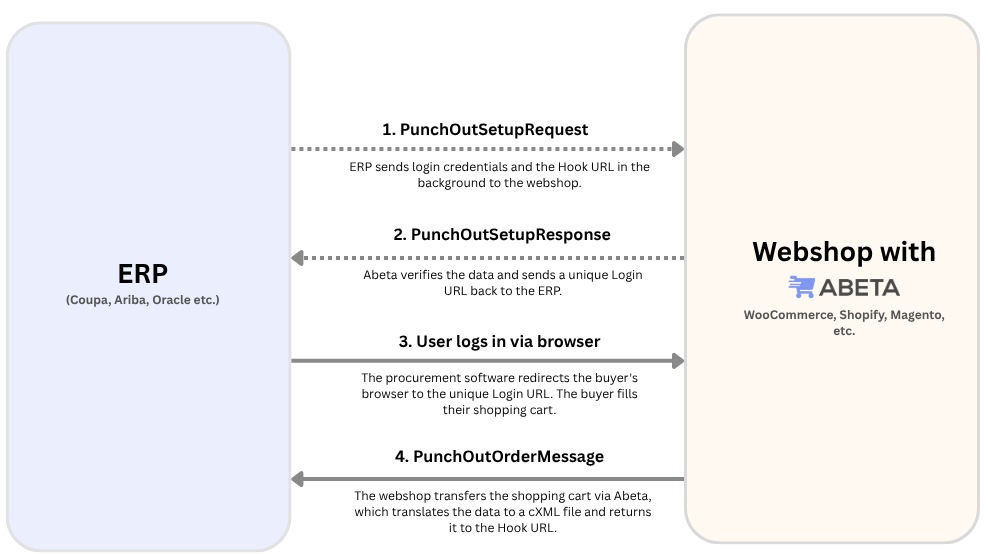
The cXML PunchOut process follows a standardized structure to exchange data in the background. This process can be broken down into several key steps.
#The cXML PunchOut process step-by-step
1. The login request (PunchOutSetupRequest)
To log in (PunchOut) to the webshop, the procurement system sends a cXML file to the webshop: the PunchOutSetupRequest. This file contains user credentials and a specific Hook URL where the shopping cart needs to be redirected later.
2. Validation and unique login URL (PunchOutSetupResponse)
The webshop verifies the credentials (powered by Abeta software). If the user data is correct, the webshop returns a confirmation in cXML format (the PunchOutSetupResponse) containing a one-time-use login URL to the procurement system.
Upon receiving this confirmation, the procurement system redirects the user to this URL, granting them instant, authenticated access to the webshop. The webshop tracks which URLs have been issued, which users they belong to, and the exact URL where the user and their shopping cart should eventually be returned.
3. Returning the shopping cart (PunchOutOrderMessage)
To transfer the shopping cart back to the procurement software, a PunchOutOrderMessage is used, transferring the data securely via HTTPS. The original cXML file used during login contained the Hook URL for redirection. Abeta ensures that both the user and the cXML file containing the shopping cart data are sent back to this address via an HTTPS POST request. The user can then immediately view their selected products within their procurement system.
#Technical documentation & advice
If you want to dive deeper into the technical details, we highly recommend reviewing the official cXML documentation.
Are you getting stuck while setting up these protocols for your platform, or does a client require a cXML punchout catalog integration that your webshop currently doesn't support? We are happy to help. Feel free to contact us today for a free consultation.